Trial
Every install gets two separate things on day one: Atlassian’s standard 30-day evaluation of the edition you’re evaluating, and a one-time starter grant of scan credits so you can run real scans and see real findings before you decide. They’re not the same clock — the evaluation governs your edition and billing on Atlassian’s side; the credit grant is ours, and it doesn’t expire when the evaluation does. This page explains both, and how to switch to a paid plan early if you want your full credit allowance before the 30 days are up.
How the trial works
Section titled “How the trial works”The trial is Atlassian’s standard Marketplace evaluation: 30 days, billed by Atlassian, nothing to enter with us. For the length of it you get the edition you’re evaluating, in full — the complete fix loop and all three finders. Bring-your-own-key is the one thing an evaluation doesn’t include: it unlocks when you convert to a paid Advanced subscription. See Editions & plans.
Scan credits are a separate mechanism from that evaluation clock. Every install — trial or paid — gets a one-time starter grant the moment its tenant is created: currently $50 worth. It doesn’t expire and isn’t tied to the 30-day evaluation window — it’s the same grant whether you stay on the trial or convert to paid. See What the starter grant covers below.
There’s no separate WikiFix invoice, no top-ups, and no card to enter with us — the trial and any later subscription are both handled entirely through Atlassian. See Editions & plans for what Standard and Advanced each include.
What the starter grant covers
Section titled “What the starter grant covers”Your subscription converts into scan credits — the unit the scanner actually spends — and the starter grant is real spending power, not a teaser: enough to scan a real space and see real findings before you commit to anything.
Credits pay for the scan, and for the AI-authored rewrite when you apply a fix. Free: browsing scans, reverting, asking an owner to decide, the page badge, and applying a departed-owner reassignment (no LLM involved). For exactly what a credit buys, see Credits & capacity.
Upgrade to a paid plan before the trial ends
Section titled “Upgrade to a paid plan before the trial ends”You don’t have to wait out the 30 days. If you’ve seen enough and want your full paid credit allowance now, you can skip the trial and buy immediately from Atlassian’s admin console. Upgrading early doesn’t touch your starter grant — whatever’s left of it keeps spending — and adds your plan’s full monthly credit allowance on top, straight away.
You need to be a billing admin or organization admin to do this.
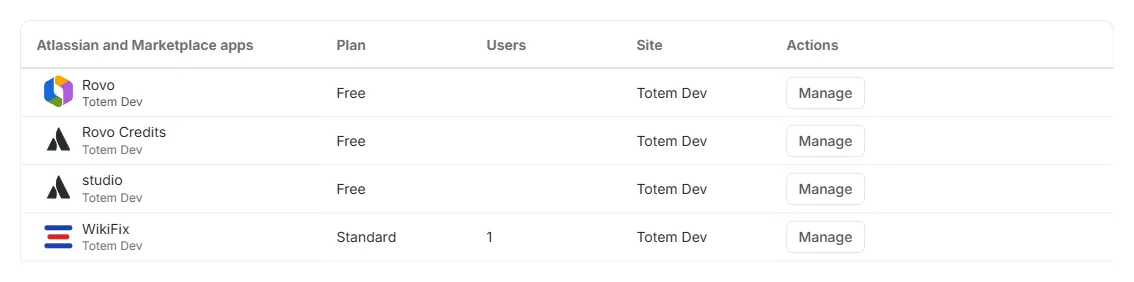
- Go to your Atlassian Admin Console and open Billing.
- Find WikiFix in your list of apps and click Manage.
- Click Change plan and choose the plan you want.
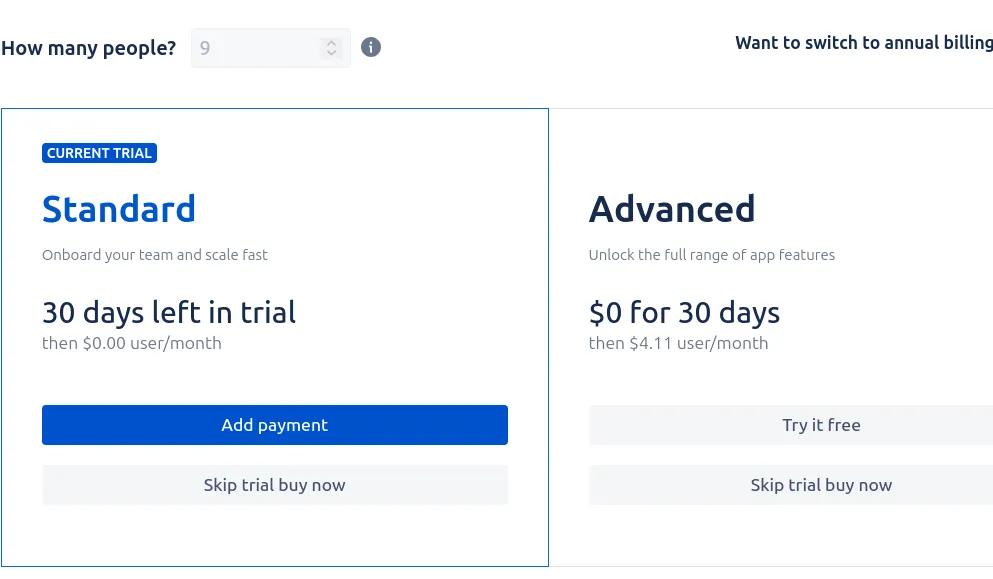
- On the change-plan screen, choose Skip trial buy now for your plan.
Steps 1–2 — Billing lists every app on your site, each row ending in Manage:
Step 3 — Change plan sits at the top right of the app’s subscription screen:

Step 4 — the plans appear side by side, each with a Skip trial buy now button beneath it:
If something goes wrong
Section titled “If something goes wrong”If the change-plan screen errors out, or the option to skip the trial doesn’t appear because of a hiccup on Atlassian’s side, you don’t have to fight it. Contact Atlassian Support, or email us at support@wikifix.ai — we can take care of it and help you skip the trial.
Where to go next
Section titled “Where to go next”- Editions & plans — Standard vs Advanced, and how to switch editions.
- Credits & capacity — what a credit buys, what each plan covers, and what happens when credits run out.
- Getting started — install, your first scan, reading and resolving findings.
Anything these don’t answer: support@wikifix.ai.