Credits & capacity
WikiFix is billed through Atlassian at a per-user price, and your subscription converts into scan credits — the unit the scanner actually spends. This page explains the conversion, what consumes credits, and what happens when the balance hits zero.
What a credit buys
Section titled “What a credit buys”Credits pay for the work a scan does, and for the AI-authored rewrite when you apply a fix. There are four parts, and the in-product credits screen shows the live rate for each:
- AI comparisons. Every time the scanner spots related passages, an AI model compares them to decide whether they genuinely contradict. That comparison spends credits, metered by the amount of text analyzed — the more overlapping content your spaces have, the more comparisons a scan runs.
- A small per-page scan fee. Each scan checks every page in scope, so a small credit charge applies per page checked — whether or not that page changed since last time. This is the steady, predictable cost of running a scan; a clean, stable wiki costs little, a large one costs proportionally more.
- A small per-finding fee on the non-AI checks. The departed-owner check (and other non-AI checks) charge a few credits per finding they raise — these are rare, so the cost is minor. No findings, no charge.
- The fix rewrite itself. Applying a fix that needs the AI to rewrite a passage — the main resolve loop, or a page consolidation — is metered the same way as a scan comparison: priced off the model usage, charged once per fix. If you’re on your own key, this runs on your key and costs no credits, same as scanning.
Free: browsing scans, reverting, asking an owner to decide, the page badge, and applying a departed-owner reassignment — none of these involve an LLM call. Credits pay for the AI work, not for looking at or acting on results that don’t need it.
Exact per-check credit rates are being finalized ahead of the Marketplace launch and will be published here. The in-product credits screen always shows the current rates.
What each plan covers
Section titled “What each plan covers”Your subscription converts into scan credits at a fixed rate — every dollar you pay becomes the same number of credits, on either edition. Your monthly allowance scales directly with your plan: more seats, or the higher-priced Advanced edition, means a larger grant — sized to cover a normal scan cadence (weekly scans of your active spaces) with headroom.
For current per-seat pricing and the seat tiers, see the WikiFix Marketplace listing — Atlassian is the source of truth for price. Your in-product credits screen always shows your actual monthly grant and the live per-check rates.
Each billing cycle brings a fresh batch of credits — allow a few hours after your renewal date for them to show up, and you get the full period either way.
Unused credits don’t vanish the moment the cycle ends: they carry past the period boundary for a grace buffer before expiring, so a renewal that lands a day or two late doesn’t strand you with a dead balance in between. The buffer is the same length for every tenant regardless of plan, and it’s tunable on our side rather than fixed in the app — your in-product credits screen always shows exactly when each grant expires.
If you’re on a discounted plan, credits are granted on what you pay — a discount is a smaller allowance at a matching price, so every credit costs the same.
The trial
Section titled “The trial”Every install also gets a one-time starter grant of scan credits — currently $50 worth — enough to scan a real space and see real findings. That’s separate from Atlassian’s 30-day evaluation, which runs alongside it: the starter grant doesn’t expire, the evaluation window is what’s time-limited. If you want your full paid allowance before the evaluation ends, you can skip the trial and buy immediately through Atlassian. See the Trial page for how both work and the step-by-step early-upgrade flow, and Editions & plans for what each edition includes.
When credits run out
Section titled “When credits run out”The running scan stops cleanly and the run is marked credit exhausted. Findings already produced stay on the scan — nothing is lost, and nothing is charged beyond your balance. Scanning picks up again when:
- your next billing period’s grant arrives — allow a few hours after your renewal date — or
- on a paid Advanced plan, you add your own Anthropic API key — then scans don’t stop at all (see below).
Bring your own Anthropic key (Advanced)
Section titled “Bring your own Anthropic key (Advanced)”Bring-your-own-key is an Advanced-edition capability on a paid subscription. Standard tenants don’t have it, and it isn’t available during Atlassian’s 30-day evaluation — it unlocks when you convert to a paid Advanced plan — allow a few hours for the key field to appear. See Editions & plans for how the editions differ and how to switch.
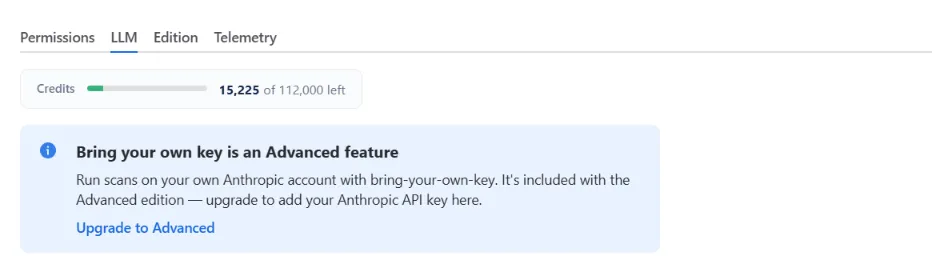
On Advanced, if your scan volume outgrows the credit allowance, add your own Anthropic API key in WikiFix Admin → LLM. The AI analysis then runs on your Anthropic account instead of consuming credits. The other scan fees — the per-page scan fee and the per-finding fee on the non-AI checks — are charged only while a scan is drawing on credits; once a scan is running on your own key, those fees are waived and the scan completes on the key. You choose the order: key-only, or credits first with the key as an automatic fallback — when the credits run out mid-scan, the key takes over without interrupting the run.
Your key covers applying fixes too, not just scanning. The AI-authored rewrite that runs when you click Apply follows the same routing and the same credits-first preference — so on a key-only setup, neither scanning nor fixing draws down credits.
One thing to know before you add a key: with your own key, the AI step is sent to Anthropic’s API under your account and your agreement with Anthropic — not through the EU AWS Bedrock route described on the security page, which covers the default no-key setup.
Where to see your balance
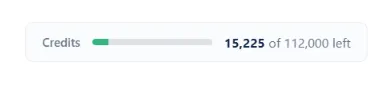
Section titled “Where to see your balance”The credits bar at the top of WikiFix shows this month’s remaining grant, any carry-over from earlier grants, and — if you’ve added a key — whether it’s on standby or in use. During a scan the bar updates live as the scan spends credits.