Editions & plans
WikiFix ships in two editions on the Atlassian Marketplace: Standard and Advanced. Both are billed by Atlassian as part of your app subscription — there’s no separate WikiFix invoice, no top-ups, and no card to enter with us. This page covers what each edition includes, how the trial works, and how to change editions.
Standard vs Advanced
Section titled “Standard vs Advanced”Standard
Everything WikiFix does, billed with your Atlassian subscription.
- The full fix loop — scan, findings, apply, ask owner, revert
- All available finders
- Monthly scan credits, included with your subscription
Advanced
Everything in Standard, with room to scan more — and your own key.
- Everything in Standard
- A larger monthly credit allowance
- Bring your own Anthropic key (BYOK) — on a paid plan; not during the 30-day trial
Advanced doesn’t unlock a different scanner or different finders — the loop and the checks are identical on both editions. What changes is how much you can scan before credits run low, and whether you can route the AI step through your own Anthropic account.

More credits on Advanced
Section titled “More credits on Advanced”Your subscription converts into scan credits at a fixed rate — every dollar you pay becomes the same number of credits, on either edition. Advanced is priced higher than Standard, so the same conversion lands a larger monthly grant. There’s no separate “Advanced credit pack” to buy and no per-edition cap you can hit independently of price — the extra credits fall straight out of the higher price.
For how a credit is spent and what each check costs, see Credits & capacity.
Bring your own Anthropic key (Advanced)
Section titled “Bring your own Anthropic key (Advanced)”On a paid Advanced plan you can add your own Anthropic API key, so the AI work runs on your Anthropic account instead of drawing down credits — both the scan and the rewrite that authors a fix when you click Apply.
Two limits worth knowing upfront: Standard tenants don’t have it, and it isn’t available during Atlassian’s 30-day evaluation. It unlocks when the evaluation converts to a paid Advanced subscription.
See Credits & capacity for how the key interacts with credits during a scan.
The trial
Section titled “The trial”New installs get two separate things: Atlassian’s standard 30-day evaluation of the edition you’re evaluating, and a one-time starter grant of scan credits — currently $50 worth — so you can scan a real space and see real findings before you decide. The grant doesn’t expire with the evaluation: it’s ours, not Atlassian’s, and it’s the same grant whether or not you convert to paid.
When you’re ready to keep going past the trial — or you want your full paid allowance before it ends — you upgrade through Atlassian, not inside WikiFix. You can skip the trial and buy immediately from your Atlassian admin console. See the Trial page for the step-by-step upgrade flow, or Credits & capacity for how the credit allowance changes.
Changing your edition
Section titled “Changing your edition”Editions are managed on Atlassian’s side, and you do it yourself — no need to contact us. You switch between Standard and Advanced from your Atlassian app subscription, the same place you manage any Atlassian app, and WikiFix picks the change up shortly after.
Upgrade from Standard to Advanced
Section titled “Upgrade from Standard to Advanced”You need to be a billing admin or organization admin to change the plan. It’s four steps in Atlassian’s admin console:
- Go to your Atlassian Admin Console and open Billing.
- Find WikiFix in your list of apps and click Manage.
- Click Change plan.
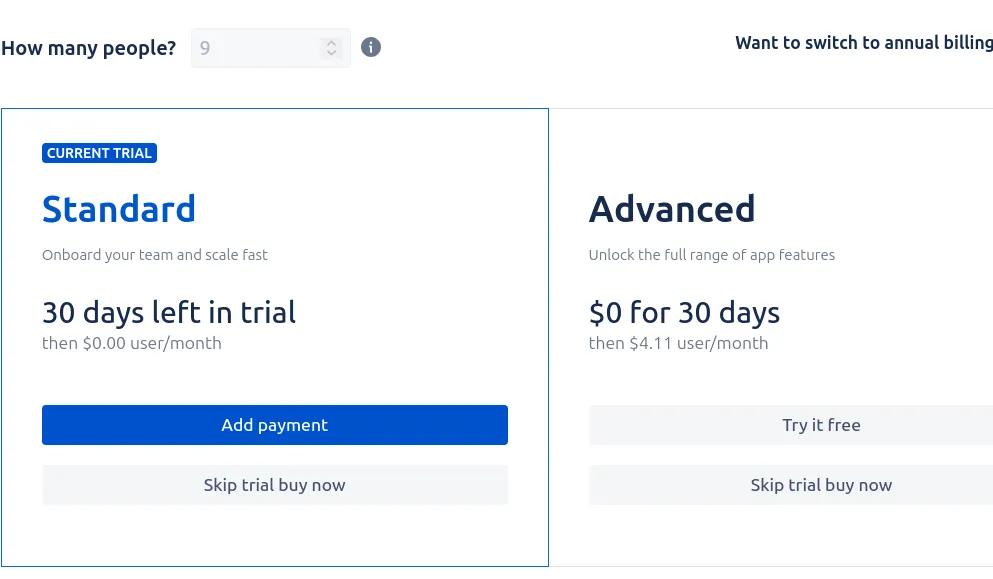
- On the Choose the right plan for you screen, pick Advanced and confirm.
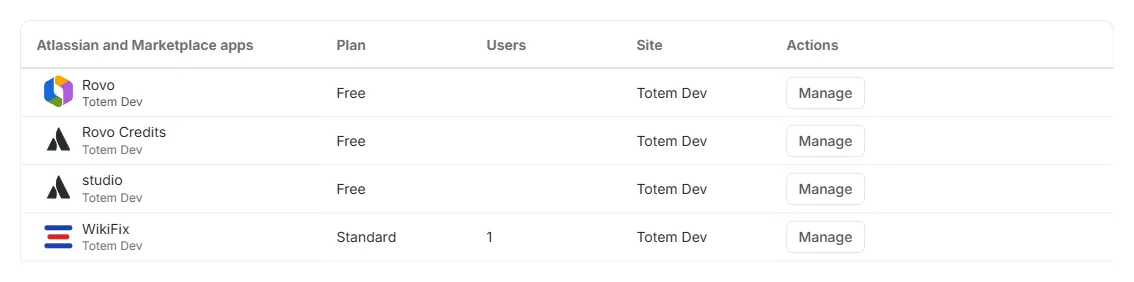
Steps 1–2 — Billing lists every app on your site, each row ending in Manage:
Step 3 — Change plan sits at the top right of the app’s subscription screen:

Step 4 — a side-by-side of the two editions, with your current one marked and the other offering the switch:
Your larger credit allowance and bring-your-own-key arrive with the upgrade — usually within a few hours. If Advanced still hasn’t shown up after a day, tell us.
Move back to Standard
Section titled “Move back to Standard”Same path, one different click — and the timing differs:
- Go to your Atlassian Admin Console and open Billing.
- Find WikiFix in your list of apps and click Manage.
- Click Change plan.
- Pick Standard and confirm.
A downgrade is scheduled for the end of your current billing period rather than applied on the spot, so you keep Advanced — the larger allowance and bring-your-own-key — for everything you’ve already paid for. Until that date nothing about your scanning changes.
Two things change once it takes effect: the next grant is sized from Standard’s price rather than Advanced’s, and bring-your-own-key stops being available, so scanning that ran on your own Anthropic key goes back to spending credits. Credits you’ve already been granted aren’t taken back — each grant runs to its own expiry, which you can see on the in-product credits screen.
Expect the same few hours’ lag at the end of the period, so bring-your-own-key may keep working a little past your renewal date.
After upgrading to Advanced, update WikiFix to the latest version if you’re behind — Advanced capabilities need the current app version.
From inside WikiFix
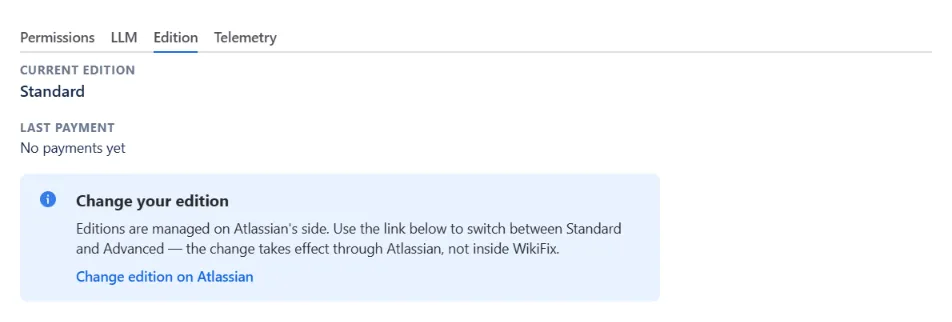
Section titled “From inside WikiFix”The Edition panel in WikiFix Admin shows your current edition and your last Marketplace payment, and links back to the steps above. WikiFix never processes the edition change itself, so the panel is a signpost rather than a control — but it is where to check whether a change has landed yet.
If the change-plan screen errors out, or the option doesn’t appear because of a hiccup on Atlassian’s side, contact Atlassian Support, or email us at support@wikifix.ai and we’ll help.
Where to go next
Section titled “Where to go next”- Credits & capacity — what a credit buys, what each edition’s allowance covers, and bring-your-own-key.
- How it works — the scan to review to apply loop and the credits model.
- Configuration reference — permissions, scanning scope and schedule, notifications, and the scan-completion email.
- FAQ — the questions we expect.
Anything these don’t answer: support@wikifix.ai.